Before I read a single word of a new client’s website, I check the page source. The meta tags for SEO at the top of the page usually tell me how much care the site has received.
If I see “Home” as a title and no description at all, I already know where the audit will start.
Meta tags for SEO are easy to overlook, and they’re also easy to fix. In this post, I’ll explain what they are, which ones I look at first, and how I check them.
Table of Contents
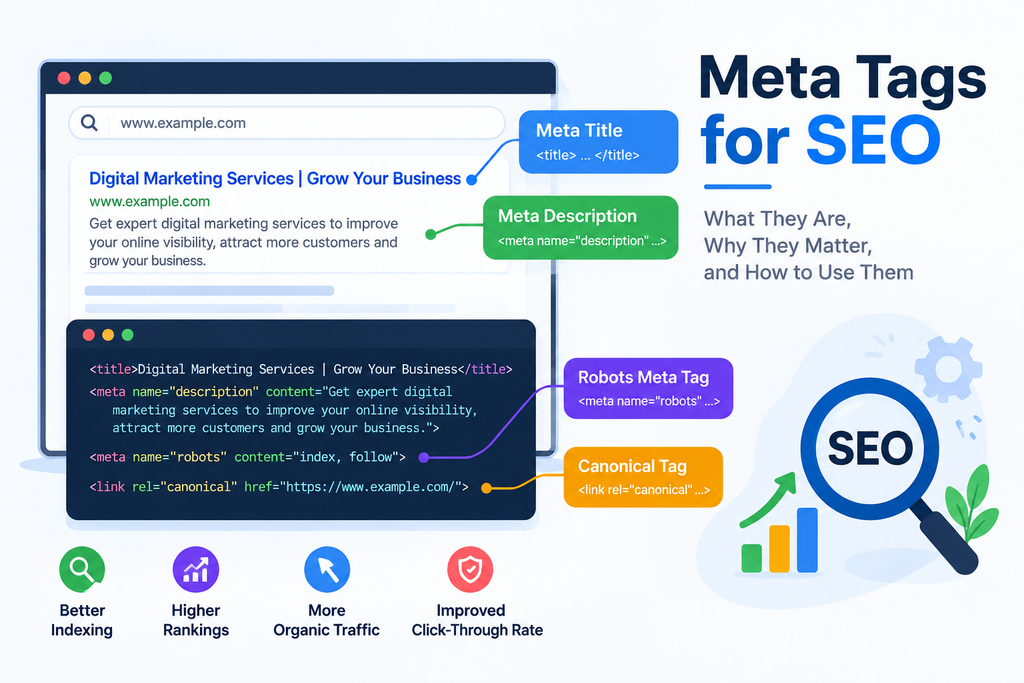
What Are Meta Tags?
A meta tag is a line of HTML that lives in the <head> of a page. You won’t see it when you visit the site. Search engines and browsers read it, though.
A few of them shape the way your page appears in search results. Others give crawlers instructions, such as whether a page should be indexed.
Why They Matter, and Why They Don’t Matter as Much as People Think
A great title tag can’t fix bad content. If a page is thin, or it doesn’t answer what people are searching for, no tag will save it.
Still, I wouldn’t ignore them. Your title and description are the first thing a searcher reads about you, so they affect who clicks. And a wrong robots or canonical tag can quietly keep a good page out of Google.
Keep in mind that Google may also rewrite your title or snippet when it thinks something else fits the query better. Write what’s true for the page and accept that it won’t always appear as typed.
The Title Tag
Of all the meta tags, this is the one I end up fixing most. The same five problems come up again and again:
- The title runs long and gets truncated in results.
- The main keyword is missing, or it sits at the very end.
- Different pages have identical titles.
- The title is something bare like “Home” or “Services.”
- It doesn’t match what the page is about or what the searcher wanted.
Here’s the kind of change I make. A page titled “Services | Company Name” gives a searcher nothing to go on. Change it to “Digital Marketing Services in Palakkad | Company Name” and suddenly it says what the company does and where.
Try to stay near 60 characters. Google cuts titles by pixel width, not character count, so a crawler preview is the safest check.
[Add here: one real page you changed, and what happened afterward, even if it’s small.]
The Meta Description
Google says the meta description isn’t a ranking factor, but Meta Tags for SEO still matter because they can influence whether a person clicks on your result. When working with Meta Tags for SEO, I focus on writing descriptions that are clear, useful, and relevant to the searcher.
What I see most often is a description that’s either generic or stuffed with keywords. Take “Digital marketing services. SEO services. Social media marketing services.” That’s just a list of phrases, and nobody feels invited by it.
I’d write it like this: “Explore digital marketing services in Palakkad, including SEO, social media marketing, and content marketing to help your business reach more customers.” This approach shows how Meta Tags for SEO can support a better search experience. The keyword is in there, it explains the page, and it hints at a benefit. If it suits the page, finish with a short call to action. Around 150 to 160 characters usually avoids truncation.
The searcher comes first when I write one. Keyword placement is the second concern.
The Technical Tags
Robots
This one tells search engines whether to index a page and follow its links. The value that causes trouble is noindex.
html
<meta name=”robots” content=”noindex, follow”>
It has a place on pages like thank-you screens. Put it on an important page by mistake and that page can vanish from results.
I haven’t dealt with this on a client site yet, so I’ll say how I’d approach it instead of pretending otherwise. First I’d check the page in Search Console and look at the source to confirm the tag. After removing it, I’d make sure the canonical points to the right URL, then request re-indexing. Similar pages would get a look too, since a mistake like this often isn’t limited to one URL.
Canonical
The canonical tag points to the preferred version of a page when near-duplicates exist.
html
<link rel=”canonical” href=”https://example.com/meta-tags-for-seo”>
Google reads it as a strong hint. If the rest of your signals disagree with it, Google may go its own way.
Viewport and Open Graph
The viewport tag makes a page render properly on a phone. Most themes include it, but I confirm it anyway.
html
<meta name=”viewport” content=”width=device-width, initial-scale=1″>
Open Graph tags control the preview when someone shares a link on social media. They won’t move your rankings. I still check them, because a broken preview makes a site look unfinished.
The meta keywords tag is the one to skip entirely. Google ignores it.
A Quick Comparison
| Tag | Job | Priority |
| Title tag | Headline in search results | High |
| Meta description | Summary shown under the title | High |
| Robots tag | Controls indexing | High |
| Canonical tag | Names the preferred URL | High |
| Viewport tag | Mobile display | Medium |
| Open Graph tags | Social share preview | Low |
How I Audit Meta Tags
On a new site, I work through it in this order:
- Run a crawl and look for titles and descriptions that are missing, duplicated, or too long.
- Read through the titles and descriptions to see whether each one is unique and uses its keyword naturally.
- Look at the robots and canonical tags so the right pages can be indexed and the canonicals point where they should.
- Check the viewport and Open Graph tags.
- Sort the problems by likely SEO impact and fix the important pages first.
- Crawl again afterward to make sure the fixes actually went live.
My usual tools are Google Search Console, Screaming Frog, and Chrome’s page source. When I have access, I add Ahrefs or Semrush.
What I’d Tell a Beginner
Don’t spend all your time on meta tags. They’re a small part of the picture.
If I were setting priorities, I’d go in this order: useful content, then search intent, then technical SEO, then titles and descriptions, then testing and improving what you’ve done.
Also, resist the urge to squeeze your keyword into every tag. Write for the person reading, and put the keyword in where it fits on its own.
FAQs
What are meta tags in SEO?
Meta tags for SEO are bits of HTML placed in a page’s <head> section that give search engines information about the page. Common examples include the title tag, meta description, robots tag, and canonical tag.
Do meta tags help rankings?
Some meta tags for SEO can influence how search engines understand and handle a page. The title tag is a relevance signal, while the meta description mainly helps influence clicks. Robots and canonical tags can also affect how a page is indexed and displayed.
How long should a meta description be?
For meta tags for SEO, a meta description of around 150 to 160 characters is a useful target. However, Google may display different amounts of text depending on the device and search result.
Is the meta keywords tag still useful?
No. The meta keywords tag is not useful for modern meta tags for SEO because Google does not use it as a ranking signal. It is better to focus on useful page content, a clear title tag, and a relevant meta description.
Conclusion
Meta tags for SEO won’t rescue weak content, but they can help search engines understand your pages and help the right people decide to click. When using meta tags for SEO, give every page a unique title and meta description, check your robots and canonical tags, and make sure each tag matches the page content. Once you’ve made these meta tags for SEO improvements, crawl the site again and check that everything is working as expected.
Looking for a freelance digital marketer in Palakkad to grow your business online? I help businesses, startups, and personal brands build a stronger digital presence through practical and result-focused digital marketing strategies. From SEO and social media marketing to Google Ads, content marketing, and website optimization, I provide customized solutions based on your business goals.